Product Spotlight Hero
An image-led product configurator. Change the finish, inspect another view, and compare models with a live price and dimensions.
Sound. In its purest form.
One considered object. A quieter presence. Made for the spaces where life happens.
FORM. FUNCTION. NOTHING EXTRA.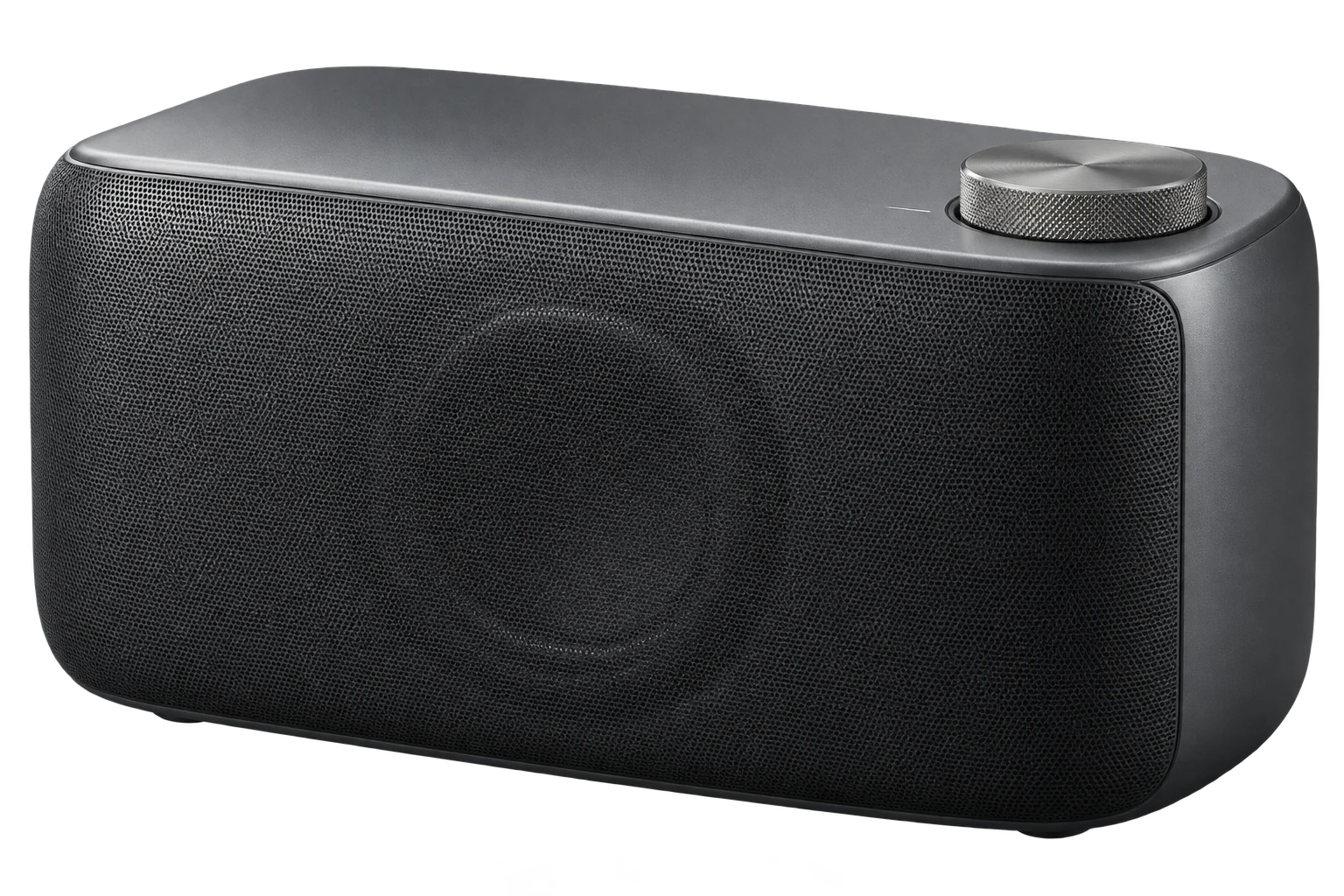
MONO / A FICTIONAL PRODUCT DESIGN STUDYMONO 01 / Graphite / $390
'use client';

import { useId, useState, type CSSProperties } from 'react';
import './product-spotlight-hero.css';

export interface ProductSpotlightImage {
  src: string;
  alt: string;
}

export interface ProductSpotlightFeature {
  id: string;
  label: string;
  detail: string;
  /** Positions from 0 to 1, relative to the complete main image. */
  x: number;
  y: number;
}

export interface ProductSpotlightView {
  id: string;
  label: string;
  image: ProductSpotlightImage;
}

export interface ProductSpotlightVariant {
  id: string;
  label: string;
  /** Any valid CSS color for the finish swatch. */
  color: string;
  image: ProductSpotlightImage;
  /** Extra images of this finish. The main image is always the first view. */
  views?: ProductSpotlightView[];
}

export interface ProductSpotlightSize {
  id: string;
  label: string;
  dimensions: string;
  /** A formatted price, including its currency. */
  price: string;
}

export interface ProductSpotlightSelection {
  variant: ProductSpotlightVariant | null;
  size: ProductSpotlightSize | null;
  view: ProductSpotlightView;
  image: ProductSpotlightImage;
}

export interface ProductSpotlightHeroProps {
  eyebrow?: string;
  title: string;
  description?: string;
  kicker?: string;
  note?: string;
  image: ProductSpotlightImage;
  features: ProductSpotlightFeature[];
  productName?: string;
  /** Decorative collection number behind the product. */
  productNumber?: string;
  variants?: ProductSpotlightVariant[];
  sizes?: ProductSpotlightSize[];
  /** Called only after a visitor changes finish, model, or view. */
  onSelectionChange?: (selection: ProductSpotlightSelection) => void;
  action?: { label: string; href: string };
  className?: string;
}

const emptyVariants: ProductSpotlightVariant[] = [];
const emptySizes: ProductSpotlightSize[] = [];

function position(value: number) {
  return `${Math.min(1, Math.max(0, Number.isFinite(value) ? value : .5)) * 100}%`;
}

function viewsFor(variant: ProductSpotlightVariant | null, image: ProductSpotlightImage) {
  return [{ id: 'main', label: 'Object', image: variant?.image ?? image }, ...(variant?.views ?? []).filter(view => view.id !== 'main')];
}

/** An image-led product introduction with a compact, usable configuration panel. */
export function ProductSpotlightHero({
  eyebrow,
  title,
  description,
  kicker,
  note,
  image,
  features,
  productName = 'OBJECT / 01',
  productNumber = '01',
  variants = emptyVariants,
  sizes = emptySizes,
  onSelectionChange,
  action,
  className = '',
}: ProductSpotlightHeroProps) {
  const [variantId, setVariantId] = useState<string | null>(null);
  const [sizeId, setSizeId] = useState<string | null>(null);
  const [viewId, setViewId] = useState('main');
  const [featureId, setFeatureId] = useState<string | null>(null);
  const [imageRatio, setImageRatio] = useState(1.5);
  const selectedVariant = variants.find(item => item.id === variantId) ?? variants[0] ?? null;
  const selectedSize = sizes.find(item => item.id === sizeId) ?? sizes[0] ?? null;
  const views = viewsFor(selectedVariant, image);
  const selectedView = views.find(item => item.id === viewId) ?? views[0];
  const selectedFeature = features.find(item => item.id === featureId);
  const instance = useId();
  const titleId = `ac-spotlight-title-${instance}`;
  const detailId = `ac-spotlight-detail-${instance}`;
  const summaryId = `ac-spotlight-summary-${instance}`;

  function chooseVariant(variant: ProductSpotlightVariant) {
    const view = viewsFor(variant, image)[0];
    setVariantId(variant.id);
    setViewId('main');
    setFeatureId(null);
    onSelectionChange?.({ variant, size: selectedSize, view, image: view.image });
  }

  function chooseSize(size: ProductSpotlightSize) {
    setSizeId(size.id);
    onSelectionChange?.({ variant: selectedVariant, size, view: selectedView, image: selectedView.image });
  }

  function chooseView(view: ProductSpotlightView) {
    setViewId(view.id);
    setFeatureId(null);
    onSelectionChange?.({ variant: selectedVariant, size: selectedSize, view, image: view.image });
  }

  return (
    <section className={`ac-product-spotlight-hero ${className}`.trim()} aria-labelledby={titleId}>
      <header className="ac-product-spotlight-masthead">
        <span className="ac-product-spotlight-wordmark">{productName}</span>
        <span className="ac-product-spotlight-edition">{eyebrow ?? 'AN OBJECT, CONSIDERED.'}</span>
        <span className="ac-product-spotlight-index" aria-hidden="true">({productNumber})</span>
      </header>

      <div className="ac-product-spotlight-stage">
        <div className="ac-product-spotlight-copy">
          {kicker && <span className="ac-product-spotlight-kicker"><span aria-hidden="true"/>{kicker}</span>}
          <h2 id={titleId}>{title}</h2>
          {description && <p className="ac-product-spotlight-description">{description}</p>}
          {note && <span className="ac-product-spotlight-scroll-note">{note}<span aria-hidden="true">↘</span></span>}
        </div>

        <div className="ac-product-spotlight-visual">
          <span className="ac-product-spotlight-watermark" aria-hidden="true">{productNumber}</span>
          <div className="ac-product-spotlight-image-area" data-view={selectedView.id} style={{ '--ac-spotlight-image-ratio': selectedView.id === 'main' ? imageRatio : 1.5 } as CSSProperties}>
            <img key={selectedView.image.src} src={selectedView.image.src} alt={selectedView.image.alt} onLoad={event => {
              const { naturalWidth, naturalHeight } = event.currentTarget;
              if (naturalWidth > 0 && naturalHeight > 0) setImageRatio(naturalWidth / naturalHeight);
            }} />
            {features.length > 0 && selectedView.id === 'main' && <div className="ac-product-spotlight-points" role="group" aria-label="Explore product details">
              {features.map((feature, index) => <button
                key={feature.id}
                type="button"
                className="ac-product-spotlight-point"
                style={{ left: position(feature.x), top: position(feature.y) }}
                aria-label={`Explore feature ${index + 1}: ${feature.label}`}
                aria-pressed={selectedFeature?.id === feature.id}
                aria-controls={detailId}
                onClick={() => setFeatureId(selectedFeature?.id === feature.id ? null : feature.id)}
              ><span aria-hidden="true">+</span></button>)}
            </div>}
          </div>
          <div className="ac-product-spotlight-visual-footer">
            <div className="ac-product-spotlight-view-controls" role="group" aria-label="Product views">
              {views.map((view, index) => <button key={view.id} type="button" data-view={view.id} aria-label={`View ${view.label}`} aria-pressed={selectedView.id === view.id} onClick={() => chooseView(view)}>
                <img src={view.image.src} alt="" loading="lazy"/><span className="ac-product-spotlight-view-name"><span aria-hidden="true">{String(index + 1).padStart(2, '0')}</span>{view.label}</span><span className="ac-product-spotlight-view-arrow" aria-hidden="true">↗</span>
              </button>)}
            </div>
            <span className="ac-product-spotlight-render-label">{selectedVariant?.label ?? 'PRODUCT STUDY'}<span aria-hidden="true"> / </span>{selectedView.label}</span>
          </div>
        </div>
      </div>

      {features.length > 0 && <div className="ac-product-spotlight-detail" id={detailId} aria-live="polite" aria-atomic="true">
        <span className="ac-product-spotlight-detail-label">IN THE DETAILS <span aria-hidden="true">↗</span></span>
        <div>{selectedFeature ? <><strong>{selectedFeature.label}</strong><span>{selectedFeature.detail}</span></> : <span>Explore the + points for a closer look at the design.</span>}</div>
      </div>}

      <div className="ac-product-spotlight-configuration" data-options={Number(variants.length > 0) + Number(sizes.length > 0)}>
        {variants.length > 0 && <fieldset className="ac-product-spotlight-finish">
          <legend>01 — Finish</legend>
          <div className="ac-product-spotlight-swatches">
            {variants.map(variant => <button key={variant.id} type="button" aria-label={`Finish: ${variant.label}`} aria-pressed={selectedVariant?.id === variant.id} onClick={() => chooseVariant(variant)} style={{ '--ac-spotlight-swatch': variant.color } as CSSProperties}>
              <span className="ac-product-spotlight-swatch-chip" aria-hidden="true"><span>✓</span></span><span className="ac-product-spotlight-swatch-name">{variant.label}</span>
            </button>)}
          </div>
        </fieldset>}
        {sizes.length > 0 && <fieldset className="ac-product-spotlight-model">
          <legend>02 — Model</legend>
          <div className="ac-product-spotlight-models">
            {sizes.map(size => <button key={size.id} type="button" aria-pressed={selectedSize?.id === size.id} aria-describedby={summaryId} onClick={() => chooseSize(size)}><span>{size.label}</span><span aria-hidden="true">{selectedSize?.id === size.id ? '●' : '○'}</span></button>)}
          </div>
        </fieldset>}
        <div className="ac-product-spotlight-purchase">
          <div className="ac-product-spotlight-summary" id={summaryId} aria-live="polite" aria-atomic="true">
            <div><strong>{selectedSize?.price ?? productName}</strong><span>{selectedSize?.dimensions ?? selectedVariant?.label ?? 'Explore the design'}</span></div>
            {selectedSize && <span className="ac-product-spotlight-summary-model">{selectedSize.label}{selectedVariant ? ` / ${selectedVariant.label}` : ''}</span>}
          </div>
          {action && <a className="ac-product-spotlight-action" href={action.href}>{action.label}<span aria-hidden="true">↗</span></a>}
        </div>
      </div>
    </section>
  );
}
Installation
Run this in your shadcn-configured React project. The component and stylesheet are added together.
npx shadcn@latest add http://localhost:5173/r/product-spotlight-hero.jsonThis command uses the current site address. For localhost, keep this preview running on the same computer. Files follow your configured components alias.
Usage
Import the component and make the details your own.
'use client';

import { ProductSpotlightHero } from '@/components/anticraft/ProductSpotlightHero';

export function Example() {
  return (
    <ProductSpotlightHero
      productName="MONO"
      productNumber="01"
      kicker="DESIGNED TO FEEL DIFFERENT"
      note="FORM. FUNCTION. NOTHING EXTRA."
      eyebrow="SOUND OBJECTS / COLLECTION 01"
      title={'Sound.\nIn its purest form.'}
      description="One considered object. A quieter presence. Made for the spaces where life happens."
      image={{ src: '/images/speaker-graphite.webp', alt: 'A graphite speaker in three-quarter view' }}
      variants={[
        { id: 'graphite', label: 'Graphite', color: '#343936', image: { src: '/images/speaker-graphite.webp', alt: 'The speaker in Graphite' }, views: [{ id: 'detail', label: 'Detail', image: { src: '/images/speaker-detail.webp', alt: 'A closer look at the Graphite volume dial' } }] },
        { id: 'chalk', label: 'Chalk', color: '#e8e5dd', image: { src: '/images/speaker-chalk.webp', alt: 'The speaker in Chalk' } },
      ]}
      sizes={[
        { id: 'standard', label: 'MONO 01', dimensions: '270 × 140 × 130 mm', price: '$390' },
        { id: 'plus', label: '01 PLUS', dimensions: '340 × 170 × 150 mm', price: '$540' },
      ]}
      features={[
        { id: 'control', label: 'Tactile control', detail: 'A single top dial keeps volume within easy reach.', x: 0.80, y: 0.20 },
      ]}
      onSelectionChange={({ variant, size, view, image }) => {
        // Connect the selected IDs and price to your own product flow.
        console.log(variant?.id, size?.id, size?.price, view.id, image.src);
      }}
      action={{ label: 'Explore the object', href: '/products/speaker' }}
    />
  );
}Props
| Prop | Type | Default | Description |
|---|---|---|---|
title | string | Required | The visible section heading. Newlines preserve intentional line breaks; text can still wrap naturally. Use a suitable heading level for your page hierarchy when adapting the source. |
image | ProductSpotlightImage | Required | A fallback product image with src and meaningful alt. With no variants it is the main view. Transparent product images work especially well against the stage. Main images preserve their natural aspect ratio so normalized feature points stay aligned. After the image loads, its natural ratio constrains the actual image frame to the available desktop stage height; no letterboxing is added around hotspot coordinates. |
features | ProductSpotlightFeature[] | Required | A list with unique id, label, detail, x, and y. Each point opens one compact description, without a repeated accordion. An empty list removes points and the detail strip. |
features[].x / y | number | Required | Coordinates from 0 to 1 measured from the complete main source image’s top-left corner. Values outside the range are clamped; non-finite values fall back to 0.5. Use equivalent compositions across finishes and keep points at least 44px apart at the smallest intended size. Points appear only in the main view. |
productName | string | 'OBJECT / 01' | The compact product wordmark in the masthead. The selected model appears separately in the configuration summary. |
productNumber | string | '01' | A short decorative collection number. It appears in the masthead index and as large background typography, hidden from assistive technology. |
variants | ProductSpotlightVariant[] | [] | Finish options with unique id, label, CSS color, and image {src,alt}. The first is selected initially. Choosing a finish changes the main image and resets its view to Object. Removing a selected option falls back to the first available option without firing the callback. |
variants[].views | ProductSpotlightView[] | [] | Optional additional images of this finish, each with unique id, label, and image {src,alt}. The reserved main ID is automatically supplied for the main image. Only views belonging to the current finish are shown, so a detail never accidentally displays a different finish. Extra images use a 3:2 cover crop; supply suitable detail compositions. |
sizes | ProductSpotlightSize[] | [] | Model options with unique id, label, dimensions, and formatted price including currency. Selection updates the live summary. Dimensions and prices are supplied by you; changing a model does not distort or rescale the product image. |
onSelectionChange | (selection: ProductSpotlightSelection) => void | undefined | Called in the finish, model, or view button’s event handler. Receives {variant,size,view,image}: current full option objects, a view with its ID, and the exact displayed image. Variant and size are null when their lists are empty. It never fires on initial mount or prop changes. Use it to connect your own cart, URL, pricing, or product flow. |
eyebrow | string | 'AN OBJECT, CONSIDERED.' | Short context in the masthead, such as a product family or collection. |
description | string | undefined | Optional short introduction below the display heading. Keep it concise so the product stays prominent. |
kicker | string | undefined | Optional small label above the heading. Omitted entirely when not supplied. |
note | string | undefined | Optional compact line beneath the introduction. Hidden in compact containers to keep the product prominent. |
action | { label: string; href: string } | undefined | An ordinary link to your product page, collection, or story. Selection does not alter its URL or perform a purchase. Connect onSelectionChange to your own application if the destination needs the chosen configuration. |
className | string | '' | Additional classes. Theme --ac-spotlight-surface, --ac-spotlight-ink, --ac-spotlight-muted, --ac-spotlight-line, and --ac-spotlight-accent on the root. Override --ac-spotlight-stage-height to set the desktop image stage; its wide-desktop default is clamp(480px, 32cqi, 640px), with a smaller height-based stage below 1150px component width. The stage keeps the product large on short desktop windows and may need normal page scrolling. The decorative number is bounded and clipped inside the product visual, above the configuration panel. Compact phone layouts use natural height. The composition is centered up to 1920px wide. |
Motion & accessibility
Finish swatches replace the product image. Image thumbnail buttons switch views belonging to that finish; changing finishes resets to the main view. Model buttons update dimensions, formatted price, and model name in a polite live summary. Native buttons support click, touch, Enter, and Space, with aria-pressed selection and visible keyboard focus. Image points expose one concise, politely announced detail; activating the selected point closes it. Feature points are hidden for alternate detail views. Options are stored by ID and derived from current props, so removing or replacing selected data safely falls back to the first option. Configuration callbacks run only in user event handlers. On small containers the product comes directly after the heading and the price/action row moves above the finish and model controls. A brief image fade and tiny vertical entrance disappear for reduced motion. MONO is an original fictional product study; the model dimensions and prices are illustrative, and the action opens a local design story. Supply your own images, product data, and destination.
Use semantic content and meaningful labels in your composition. Check contrast and keyboard behavior with your own styles and content.
Inspiration
The large product stage and compact configuration panel draw on Oakâme’s product experience. MONO is Anticraft’s original fictional design study, with its own renders and example product data.
Visit Oakâme product configuratorThe component source and demo artwork are original to Anticraft UI. The linked site is the design or content reference.